


Connect:    


Event Calendar

Some useful links

Online Courses

Articles


A software architect, Azure expert, and former Microsoft evangelist, Mike Benkovich dedicates huge amounts of his time to helping his fellow developers and burgeoning programmers learn about new technologies and platforms. Mike’s website equips developers with tips and resources to help them get to grips with technologies including cloud, data and devices, and he produces online courses covering areas like Azure enterprise development and serverless computing. Mike is also a chronic sharer of puns, so head over to his Twitter feed if you’re after a laugh (or a groan).

BenkoBLOG by Tags

Blog

AI and Dev Tools: Where's my Stuff?

@MikeBenkovich 10/14/2026

I've been thinking a lot lately about AI and what it means for the future of software development. There are people who use AI, and there are people who build AI. But there's another group that I think is going to be much larger, and potentially more interesting. These are the people who use AI to build software systems.

For years we've relied on specialized software engineers to translate business requirements into working applications. We gather requirements, design the solution, write code, test, deploy, and maintain it. Along the way we've developed entire professions around making sure these systems are secure, reliable, scalable, and able to work with the other systems in our enterprise.

Now AI is changing who can build those applications.

A business analyst, accountant, or operations manager can describe what they need to an AI tool and have it generate something that looks and behaves like an application. They may not understand C#, SQL, JavaScript, or how to build an API, but they understand the business problem they're trying to solve. And in many cases that's enough to get started.

Is this something fundamentally new? Or have we seen this kind of transformation before?

I think we have. And to understand where we're going, it's worth looking back at how we got here.

Remember When We Needed a DBA?

Back in the 1990s, relational databases were becoming the backbone of enterprise applications. SQL Server, Oracle, DB2, and other database engines gave us powerful ways to store, organize, and retrieve information. But working with those systems required specialized knowledge. We needed people who understood indexes, transactions, stored procedures, backups, security, and how to keep the database running.

Enter the Database Administrator, or DBA.

As enterprises grew, I would argue that the responsibilities quickly evolved into two important branches, one that focused on the database engine performance and the other on the application data. Where does customer information live? Which system owns it? What relationships exist between orders, customers, invoices, and products? How do we ensure data integrity when multiple applications need the same information?

This second group became increasingly concerned with data architecture, business meaning, and establishing a trusted source of truth. Both roles were important, but they were solving different problems. One made sure the database worked, the other made sure the information could be trusted.

Then Developers Started Taking Control

But working with DBA's acted as a brake as well, slowing down things and asking for additional review and approval before carving out the data structures much like a sculptor chisels stone. Does the data already exist? Who else uses it? Who owns it and ensure that a change in one place is reflected in all the others? The governance of the data was owned and managed by the people who owned the engine that stored it.

But as our tools and frameworks evolved, developers became more capable of working directly with databases the value of that central governance comes into question. Do we really need this? As the developer tools and languages evolved it became easier to work with data, with things like object-relational mapping, code-first development, and frameworks that could generate database schemas from application models.

Instead of sitting down with a database designer to define every table, column, and relationship, we could define our classes in code and let the framework handle much of the storage implementation. That was a pretty big deal!

With NoSQL, document databases, and cloud-native architectures we started questioning whether every application really needed to share the same relational database. Microservices took that idea further. Rather than having one enormous SQL Server containing data for every application, we could design smaller services that own their own data. Each service could choose the storage technology that made sense for its workload.

An order service might use SQL. A product catalog might use a document database. An event-processing service might use a distributed key-value store.

We were no longer limited by the size of a single database engine. We could scale services independently, distribute workloads, and let development teams make decisions closer to the problems they were solving. Of course, code-first, NoSQL, and microservices weren't all part of one coordinated evolution. They solved different problems and often worked together. But they contributed to a common shift.

Developers were gaining more control over how their applications stored and managed data.

And that created some interesting challenges.

Just Because You Can Doesn't Mean You Should

Think about what happened as applications started owning their own data. The customer service has a customer record. The billing service has information about that same customer. The shipping service needs an address, and the support system maintains information about customer interactions. Each service might be perfectly designed for the job it performs.

But what happens when the customer changes their address? Which system knows first? Which one is authoritative? How do the others find out? Or what happens when Finance and Sales have different definitions of an active customer?

Now we have a problem that isn't about SQL Server performance, indexing, or even which database technology we selected. It's about how our systems work together. We didn't eliminate the need for data architecture by making it easier for developers to create databases.

If anything, we made the architectural questions more important. We moved the responsibility for storing data closer to the application, but the enterprise still needed to understand what that data meant and how it related to everything else.

I think we're about to experience a very similar transformation with AI.

AI Is Doing for Applications What Code-First Did for Data

Consider a business user who needs an application to manage a departmental workflow. Historically, they might create a spreadsheet, build an Access database, use a low-code platform, or submit a request to IT. If the requirements were complex enough, a developer would get involved to build the application.

Today, that same business user can sit down with an AI development tool and describe what they want. "I need an application to track customer requests, assign them to team members, notify people when something is overdue, and provide a dashboard showing what's happening." AI can help create the user interface, define the data structures, write the business logic, and connect the pieces together.

With the right tools and deployment environment, that user may be able to produce something useful without writing much code at all. That's exciting! Think of all the ideas that never got built because there wasn't enough time, budget, or development capacity. We're lowering the barrier to creating software.

But here's where my database analogy comes back.

Just because someone can create an application doesn't mean they understand how that application fits into the enterprise.

Does it need its own customer database? Should it use information from the CRM system? Where do the business rules come from? Who is responsible for keeping the information accurate? And what happens when someone in another department asks AI to build something that does almost the same thing?

Are We About to Repeat an Old Mistake?

I've worked with organizations where different departments had their own databases, applications, spreadsheets, and reporting systems. Each solved a real business problem. Each had a reason for existing. But over time, the organization struggled to understand which information was correct, which system owned a particular business process, and how changes in one application affected everything else. 

We spent enormous amounts of time integrating systems that were never designed to work together. Microservices and cloud-native architectures gave us better ways to distribute those systems, but they didn't automatically solve the enterprise architecture problem. 

Now imagine what happens when creating applications becomes dramatically easier. Instead of needing a team of developers to create a departmental system, a business user can ask AI to build one.

And another.

And another.

We could end up with hundreds or thousands of independently created applications that work perfectly well on their own but have very little understanding of each other. The technology may be new, but the problem sounds awfully familiar.

So Where Does That Leave the Software Engineer?

I don't believe AI means we no longer need software engineers. I think it means we need to reconsider what we're asking them to do. The database evolution didn't eliminate the need for specialized expertise. It changed where that expertise was most valuable. As developers took on more responsibility for creating and managing application data, we still needed people who understood performance, integrity, ownership, and the relationships between systems.

Now AI is giving more people the ability to create software.

But creating an application and engineering a system that belongs in an enterprise are not necessarily the same thing. Maybe the biggest change ahead isn't how we write code. Maybe it's how we ensure that all the independently created applications and services actually work together.

And that raises some interesting questions.

  • When anyone can create an application, who decides whether we need another system?

  • Who owns the data, the business rules, and the relationships between systems?

  • If AI builds an application, who is responsible for maintaining it when the business changes?

  • And if writing code is no longer the defining skill of a software engineer, what is?

I think the answers will have a lot to do with the next evolution of enterprise software architecture.

In the next post, we'll look at what happens when everyone becomes a software builder, and why making it easier to create applications might make enterprise architecture more important than ever.

What do you think? Are we heading toward another generation of disconnected departmental applications, or will AI give us a better way to build systems that work together?

I'd love to hear what you're seeing in your own organizations.

- Mike

A World without Blueprints

@MikeBenkovich 4/29/2025

Imagine you’re handed a pile of bricks, lumber, and nails—no blueprint, no plan, no guidance—and told, “Build me a fortress that will stand for centuries.” You start stacking bricks, hammering boards. You hope your walls are straight, your gates secure, your ramparts high enough to repel invaders. You pray you remember every measurement, every joist placement, every bolt torque.

That… is how most organizations still build their cloud environments today. We hammer in security rules by hand. We patch servers one by one. We scramble to recover from failures without a guide. And when disaster strikes, the walls collapse like a house of cards.

Now, picture a different scene: You stand at your keyboard, you click run—and lines of code that you defined every server, every network, every firewall rule start running. You press Deploy, and in minutes your fortress rises, identical in every test environment, every region, every time. No guesswork. No finger-crossing.

  • Consistency in Every wall is laid true to the requirements and design.

  • Secured Every gate is reinforced with best practices and security guidlines in mind

  • Every tower has a lifeline (backups and DR).

Your environment is no longer a fragile assembly of one-off changes. It is a living artifact, defined in Code, versioned in Git, peer-reviewed, tested like your application code.


Why You Can’t Afford to Wait

  • Human Error becomes a myth: No more fat-fingered deletions or midnight firefights.

  • Configuration Drift is dead: What you tested in staging is exactly what runs in production.

  • Recovery is an automated heartbeat: Spin up the exact replica of your world in another region in minutes.

  • Compliance & Audit happen by default: Every change is a pull request you can trace, review, and rollback.

  • Cost Control is built-in: Tear down ephemeral environments the moment you’re done with them—no more orphaned servers quietly burning your budget.

This isn’t a “nice to have.” It’s the difference between surviving the next storm or watching your walls crumble.


The Forge: Tools of the Trade

  • ARM Templates & Bicep: Native Azure blueprints with first-class support and modularity.

  • Terraform: Multi-cloud sorcery that speaks the language of AWS, GCP, and Azure alike.

  • Pulumi: Write your infrastructure in C#, TypeScript, or Python—turn your Dev skills directly into cloud metal.

Each of these is your blacksmith’s hammer, your crucible for shaping resilient infrastructure.


Call to Action — Five Minutes to Build Your First Wall
I’m asking for five minutes—a small investment for a giant leap in reliability. In five minutes, I’ll show you how to:

  1. Define a simple network, a VM, and a load balancer in code.

  2. Deploy it repeatedly, in any region, with zero manual steps.

  3. Tear it down when you’re done, so you only pay for what you use.

By the end of that demo, you’ll see how IaC transforms your cloud from a labyrinth of one-off scripts into a codified, battle-tested fortress.

The choice is yours

You can keep building with mortar and guesswork. You can cross your fingers and hope nothing breaks. Or… you can forge your infrastructure in code, version it, test it, and trust it to stand against any siege.

Which would you rather have—sandcastles or stone fortresses?

Five minutes is all it takes. Let me show you the blacksmith’s forge. Let’s build something that lasts.


Welcome to BlogEngine.NET using Microsoft SQL Server

@MikeBenkovich 2/11/2016

If you see this post it means that BlogEngine.NET is running and the hard part of creating your own blog is done. There is only a few things left to do.

Write Permissions

To be able to log in, write posts and customize blog, you need to enable write permissions on the App_Data and Custom folders. If your blog is hosted at a hosting provider, you can either log into your account’s admin page or call the support.

If you wish to use a database to store your blog data, we still encourage you to enable this write access for an images you may wish to store for your blog posts.  If you are interested in using Microsoft SQL Server, MySQL, SQL CE, or other databases, please see the BlogEngine docs to get started.

Security

When you`ve got write permissions set, you need to change the username and password. Find the sign-in link located either at the bottom or top of the page depending on your current theme and click it. Now enter "admin" in both the username and password fields and click the button. You will now see an admin menu appear. It has a link to the "Users" admin page. From there you can change password, create new users and set roles and permissions. Passwords are hashed by default so you better configure email in settings for password recovery to work or learn how to do it manually.

Configuration and Profile

Now that you have your blog secured, take a look through the settings and give your new blog a title.  BlogEngine.NET is set up to take full advantage of many semantic formats and technologies such as FOAF, SIOC and APML. It means that the content stored in your BlogEngine.NET installation will be fully portable and auto-discoverable.  Be sure to fill in your author profile to take better advantage of this.

Themes, Widgets & Extensions

One last thing to consider is customizing the look and behavior of your blog. We have themes, widgets and extensions available right out of the box. You can install more right from admin panel under Custom/Gallery.

On the web

You can find news about BlogEngine.NET on the official website. For tutorials, documentation, tips and tricks visit our docs site. The ongoing development of BlogEngine.NET can be followed at CodePlex where the daily builds will be published for anyone to download.

Good luck and happy writing.

The BlogEngine.NET team


CloudTip 15-Avoid a gotcha in naming projects with Mobile Services

@MikeBenkovich 12/15/2014

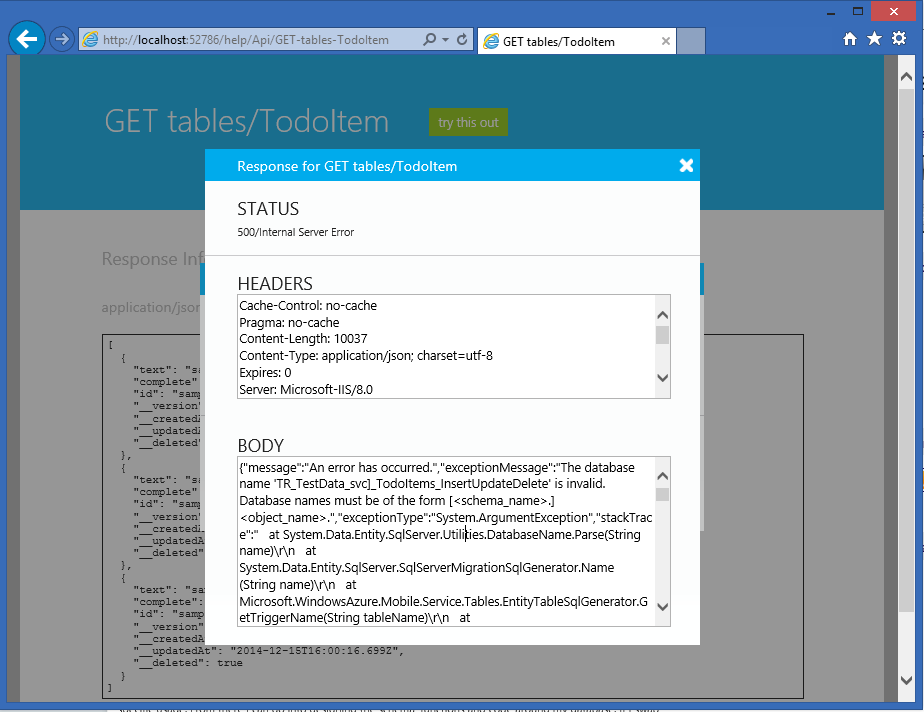
Short Answer – Don’t use special characters in a Mobile Service’s project name when you create it, the local SQL won’t be able to open the database and you may spend a lot of time figuring out why chasing down false leads…

The Long Answer…

In my last role at Microsoft as an Azure Evangelist I posted a series of cloud tips, which were intended to be quick tips for using the latest tools & services. This one is the next in that series, and focuses around some esoteric gotcha’s that come up when you’re following a convention for organizing your solution in Visual Studio. As you probably are aware you can have multiple projects in a solution, and one approach for keeping them organized is to follow a naming standard that uses a dot-syntax to keep related related things in their right spot.

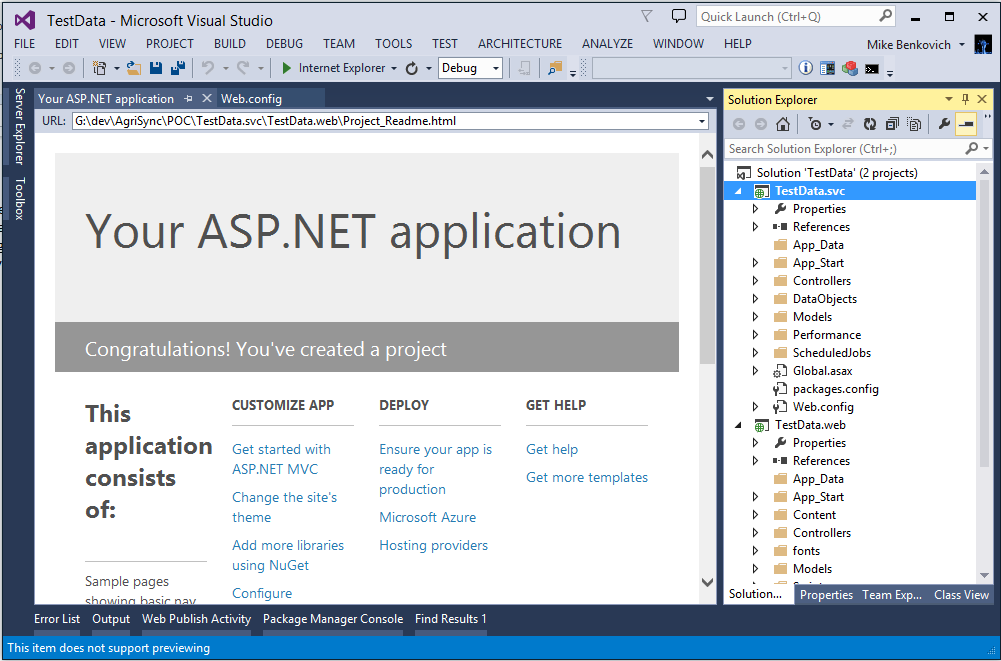
For example if my project is a solution to a to-do list, I might create the solution called “TestData”, and within that solution have a project for the web called “TestData.web” and a shared project called “TestData.shared”. Following this convention it makes sense if I want to add a data service project I might call it “TestData.svc”, right? When I try this out and build it, I was finding an error that took longer to expose than I had planned, and that’s the focus of this post.

image

I started with this solution and added some custom classes to the data tables to work with my TestData and found that I was getting  errors. The Mobile Services project type includes a testing page that allows me to try out the service and test the calls to my data, which is great. But I found that I was getting an error when I was running the project without adding or changing anything…Isn’t the stuff supposed to work “out of the box”? Instead I get the error - “The database name 'TR_TestData_svc]_TodoItems_InsertUpdateDelete' is invalid. Database names must be of the form [<schema_name>.]<object_name>”. What does this mean???

image

Don’t do this…

It looks like something’s not right with EF, so I tried updating my NuGet’s to make sure I have the latest packages…Right click the project explorer and go to the NuGet page and try update packages…this is the wrong thing to do because the template was created using specific versions of specific packages, and while some can be updated others shouldn’t.

This time I get an error that the JWTSecurityTokenHandler is broken. After some digging I found a StackOverflow post that answers this.  In particular I find that EF is unhappy with the latest MobileServices entity versions so in the NuGet Package Manager I need to uninstall the WindowsAzure.MobileServices.Backend packages and install the specific version 1.0.342.

Do this…Don’t name your Mobile Service project with special characters in the name

The problem isn’t with EF or out of date packages, it has to do with the local database name not being recognizable with the dot-syntax naming convention (another StackOverflow post). In the web config you can fix it by removing the period in the names, or you can do what I did which is just recreate the project without the dot name and test to confirm it’s working, and then rename the services project in the solution.

image

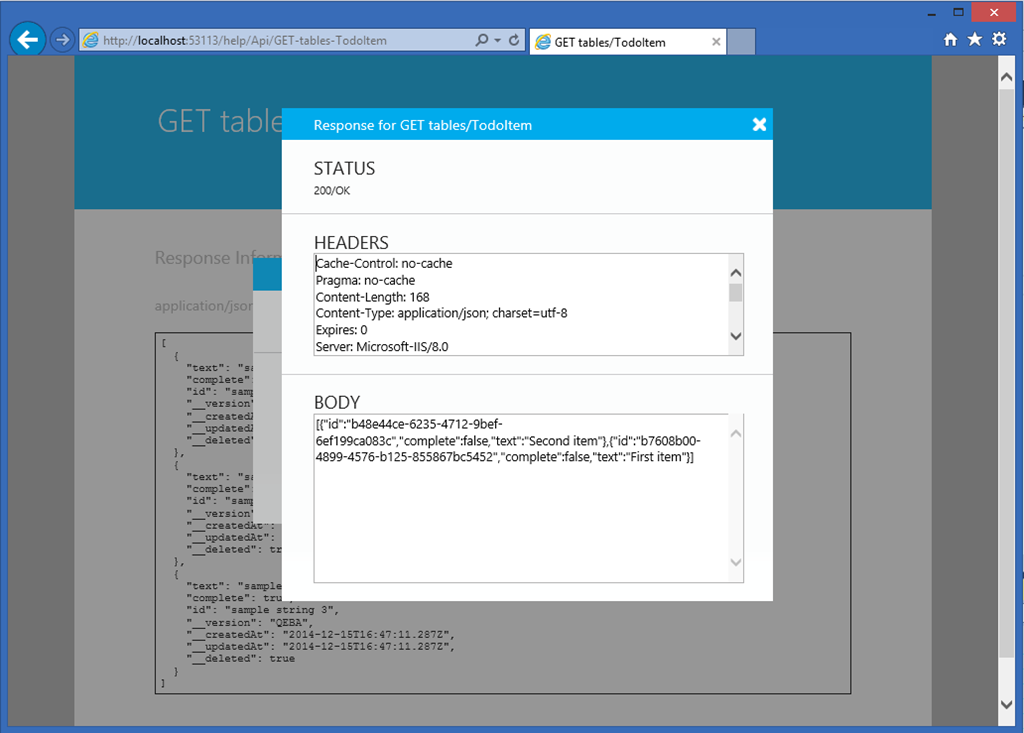
And it works! Time to go and write some code.


Avoiding Hacker Trix

@MikeBenkovich 8/19/2014

ExtremeHackerThis week we're doing a session called "Avoiding Hacker Trix" which goes thru some of the top web exploits that you should be aware of. In this webcast we will cover a variety of things including what we call the secure development process, cross site scripting attack, one click attack, SQL Injection and more. There are a bunch of links we cover, but rather than having you copy these down I'm providing them here...

Links from the slide deck:


Starting out

@MikeBenkovich 6/16/2004

In the beginning...

A long, long time ago. I can still remember how that music used to make me smile. I know that if I had my chance, that I could make those people dance and maybe they'd be happy for a while...

- Don McClean (?)

How about a little American Pie? I like to throw down a few lines of verse to get the thoughts flowing when I sit down to do a little writing. Sort of sets the mood.  I guess that this song reminds us to look at the possible, and to remember the good times that were and the ones that will be. In the software industry we've definitely seen some challenges these last few years, but I think that the changes we're seeing, and the trends that are in the air will bring a resurgence or rennaisance in the software development industry.

The last few years have forced businesses to change how they view the world in order to remain profitable. Cutting costs, canceling projects, holding off on hiring have been the hallmark of the last couple years. But recently we are seeing that manufacturing is starting to get more orders. As stability in the world economy settles in, companies are starting to hire again. Projects that have been on hold are being released into the development stream and we are starting to see the sun rise again. But how can we make sure that we get a piece of that pie?

The secret, my friends, is to be efficient. To take advantage of the tools at our disposal to be more productive. Application blocks are a great idea, and are available in the public domain. They are stepping stones that allow us to build off a solid base and deliver our projects quicker. In the current MSDN Event series we talk about using the Exception and Configuration management blocks, as well as the Updater block which allows us to add the self updating functionality.  You can download these blocks by clicking on the links above. The blocks come with documentation on how they're built and quickstart sample applications that show them in use.

Other ways that we can reduce the development costs and be more effective is to take advantage of new products such as SQL Server Reporting Services. This new product gives us the ability to rapidly create and deploy business reports with our applications  and to simplify so many of those tedious tasks surrounding the simple job of reporting. Sure we have the information, but lets make it available and useful. Besides the great authoring environment that integrates with Visual Studio, we can manage the scalability, performance and delivery of the reports by simply configuring the caching, subscriptions and security of individual reports.

In order to continue to bring home the bacon, we must demonstrate that it is more efficient to have the developer working hand in hand (if not face to face) with the business in designing and building solutions. The new RAD features of Whidbey & Yukon promise to significantly reduce the amount of code required to perform basic functions. For example, have you ever written code to see whether or not a specific machine is currently connected to the network? If you're at a cmd line you can run the PING command and see whether it times out. But to implement that programmatically requires some complicated code. At the Des Moines User Group meeting last week someone had an example he had written to do just that. The code for the ping function was 140+ lines. In the .NET 2.0 we can use the “My” object and write the same thing in one (1) line of code (!!!). Do a little exploring and you find that this new object provides a tremendous amount of intelligence about our current runtime environment.  Sure, there's a lot of other cool features of Whidbey (like the automated layout guidelines, refactoring, etc) that will make rapid prototyping a reality, but until you actually have a chance to see it in action, you won't really appreciate the impact these advances will have.

As the developer becomes more productive and is able to provide the solutions that businesses require, they will start to ask better questions. Our goal then is to be at the front of the wave that is passing through the industry, so that maybe if we're lucky we can catch it and ride until we get to where we're going.